쿠버네티스 오브젝트 다뤄보기
매니페스트(manifest) : yaml, json
pod
- pod 생성하기
 % kubectl create deployment my-httpd --image=httpd --replicas=1 --port 80
deployment.apps/my-httpd created
% kubectl get deployment -o wide
NAME       READY   UP-TO-DATE   AVAILABLE   AGE   CONTAINERS   IMAGES   SELECTOR
my-httpd   1/1     1            1           59s   httpd        httpd    app=my-httpd
% kubectl get pod -o wide
NAME                        READY   STATUS    RESTARTS   AGE   IP           NODE                        NOMINATED NODE   READINESS GATES
my-httpd-599f479b45-6fs28   1/1     Running   0          89s   10.244.0.7   k8s-cluster-control-plane   <none>           <none>
- pod 삭제
% kubectl delete deployment my-httpd
deployment.apps "my-httpd" deleted
- pod 속성 수정
% kubectl edit deployment my-httpd
apiVersion: apps/v1
kind: Deployment
metadata:
  annotations:
    deployment.kubernetes.io/revision: "1"
  creationTimestamp: "2025-02-02T06:40:45Z"
  generation: 1
  labels:
    app: my-httpd
  name: my-httpd
  namespace: default
  resourceVersion: "2951"
  uid: 1b7d0a49-e1b3-447d-9172-af5b64baeef1
spec:
  progressDeadlineSeconds: 600
  replicas: 1
  revisionHistoryLimit: 10
  selector:
    matchLabels:
      app: my-httpd
  strategy:
    rollingUpdate:
      maxSurge: 25%
      maxUnavailable: 25%
    type: RollingUpdate
  template:
    metadata:
      creationTimestamp: null
      labels:
        app: my-httpd
    spec:
      containers:
      - image: httpd
        imagePullPolicy: Always
        name: httpd
        ports:
        - containerPort: 80
          protocol: TCP
        resources: {}
        terminationMessagePath: /dev/termination-log
        terminationMessagePolicy: File
      dnsPolicy: ClusterFirst
      restartPolicy: Always
      schedulerName: default-scheduler
      securityContext: {}
      terminationGracePeriodSeconds: 30
status:
  availableReplicas: 1
  conditions:
  - lastTransitionTime: "2025-02-02T06:40:47Z"
    lastUpdateTime: "2025-02-02T06:40:47Z"
    message: Deployment has minimum availability.
    reason: MinimumReplicasAvailable
    status: "True"
    type: Available
  - lastTransitionTime: "2025-02-02T06:40:45Z"
    lastUpdateTime: "2025-02-02T06:40:47Z"
    message: ReplicaSet "my-httpd-599f479b45" has successfully progressed.
    reason: NewReplicaSetAvailable
    status: "True"
    type: Progressing
  observedGeneration: 1
  readyReplicas: 1
  replicas: 1
  updatedReplicas: 1
- pod 접속
% kubectl get pod
NAME                        READY   STATUS    RESTARTS   AGE
my-httpd-599f479b45-bwfc6   1/1     Running   0          93s
cheonkyu@cheonkyuui-Macmini k8s % kubectl exec --it my-httpd-599f479b45-bwfc6 -- /bin/bash
error: unknown flag: --it
See 'kubectl exec --help' for usage.
cheonkyu@cheonkyuui-Macmini k8s % kubectl exec -it my-httpd-599f479b45-bwfc6 -- /bin/bash
root@my-httpd-599f479b45-bwfc6:/usr/local/apache2# ls
bin  build  cgi-bin  conf  error  htdocs  icons  include  logs  modules
root@my-httpd-599f479b45-bwfc6:/usr/local/apache2# ls -al
total 56
drwxr-xr-x 1 www-data www-data 4096 Jan 24 01:28 .
drwxr-xr-x 1 root     root     4096 Jan 24 01:25 ..
drwxr-xr-x 2 root     root     4096 Jan 24 01:28 bin
drwxr-xr-x 2 root     root     4096 Jan 24 01:28 build
drwxr-xr-x 2 root     root     4096 Jan 24 01:28 cgi-bin
drwxr-xr-x 4 root     root     4096 Jan 24 01:28 conf
drwxr-xr-x 3 root     root     4096 Jan 24 01:28 error
drwxr-xr-x 2 root     root     4096 Jan 24 01:28 htdocs
drwxr-xr-x 3 root     root     4096 Jan 24 01:28 icons
drwxr-xr-x 2 root     root     4096 Jan 24 01:28 include
drwxr-xr-x 1 root     root     4096 Feb  2 06:40 logs
drwxr-xr-x 2 root     root     4096 Jan 24 01:28 modules
- pod 로그 보기
% kubectl logs my-httpd-599f479b45-bwfc6
AH00558: httpd: Could not reliably determine the server's fully qualified domain name, using 10.244.0.8. Set the 'ServerName' directive globally to suppress this message
AH00558: httpd: Could not reliably determine the server's fully qualified domain name, using 10.244.0.8. Set the 'ServerName' directive globally to suppress this message
[Sun Feb 02 06:40:47.320976 2025] [mpm_event:notice] [pid 1:tid 1] AH00489: Apache/2.4.63 (Unix) configured -- resuming normal operations
[Sun Feb 02 06:40:47.321109 2025] [core:notice] [pid 1:tid 1] AH00094: Command line: 'httpd -D FOREGROUND'
deployment(디플로이먼트)
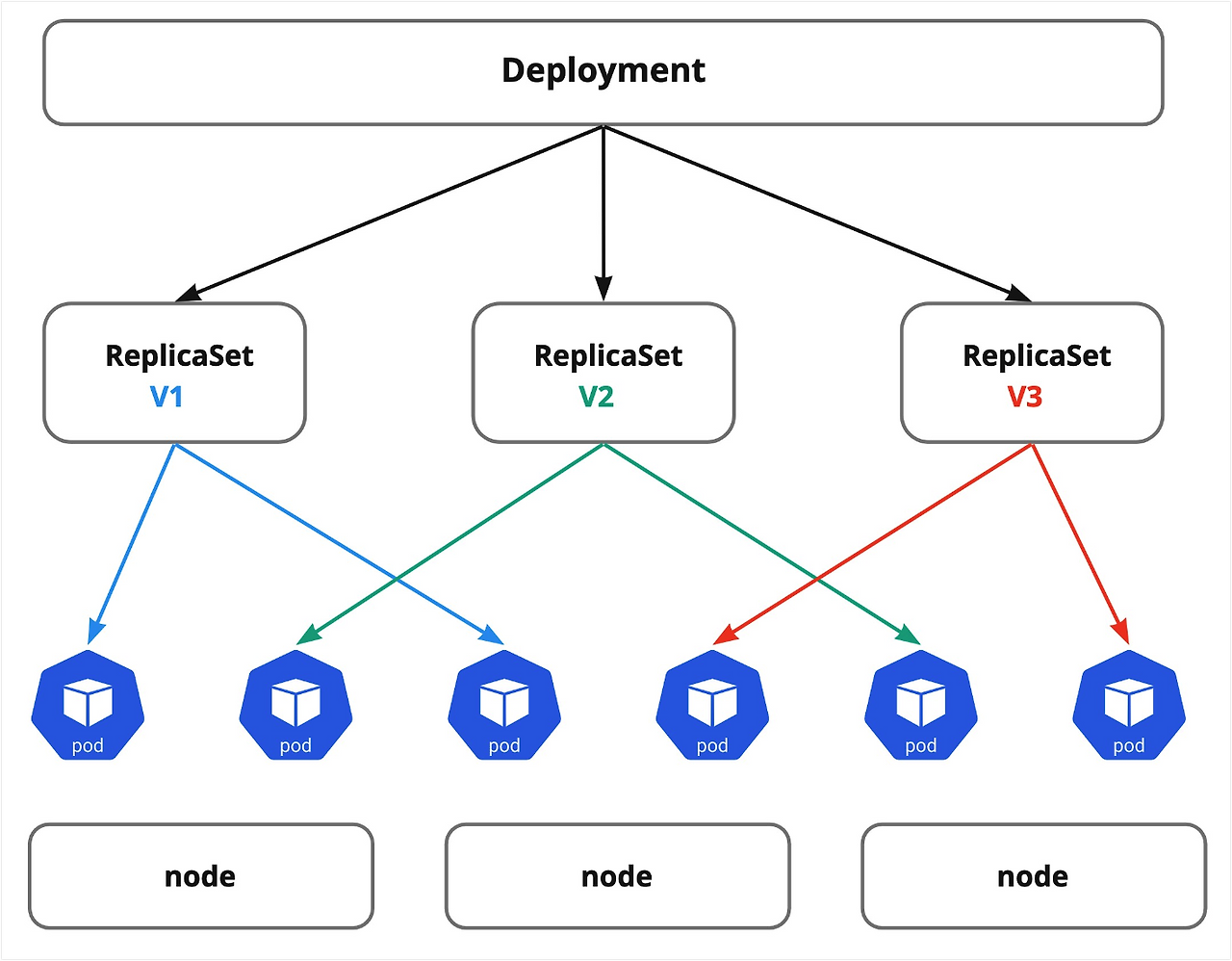
롤링 : 새버전의 애플리케이션은 하나씩 늘리고, 기존 버전의 애플리케이션은 하나씩 줄여나가는 방식 재생성 : 이전 버전의 파드를 모두 종료하고 새 버전 파드를 일괄적으로 교체하는 방식 블루/그린 : 이전 버전과 새 버전이 동시에 운용됨 카나리 : 애플리케이션의 몇몇 새로운 기능을 테스트할 때 사용됨. 두 버전 모두 배포하지만 새 버전에는 트래픽을 조금씩 흘려보내 테스트 테스트 후 이상이 없다고 판단되면 이전 버전을 종료하고 새 버전으로만 서비스
쿠버네티스 대시보드 구성
kubectl apply -f service-acount.yaml
kubectl apply -f cluster-role-binding.yaml
https://github.com/kubernetes/dashboard/blob/master/docs/user/access-control/creating-sample-user.md
kubectl get secret admin-user -n kubernetes-dashboard -o jsonpath="{.data.token}" | base64 -d
kubectl -n kubernetes-dashboard delete serviceaccount admin-user
kubectl -n kubernetes-dashboard delete clusterrolebinding admin-user
쿠버네티스 자동완성 활성화하기
source <(kubectl completion zsh)
클러스터 상태에 대한 자세한 스냅샷 얻기
kubectl cluster-info dump --all-namespaces --output-directory=$PWD/cluster-state
% tree
.
├── default
│   ├── daemonsets.json
│   ├── deployments.json
│   ├── events.json
│   ├── nginx-deploy-96b9d695-jjvdq
│   │   └── logs.txt
│   ├── nginx-deploy-96b9d695-vskd4
│   │   └── logs.txt
│   ├── pods.json
│   ├── replicasets.json
│   ├── replication-controllers.json
│   └── services.json
├── kube-node-lease
│   ├── daemonsets.json
│   ├── deployments.json
│   ├── events.json
│   ├── pods.json
│   ├── replicasets.json
│   ├── replication-controllers.json
│   └── services.json
├── kube-public
│   ├── daemonsets.json
│   ├── deployments.json
│   ├── events.json
│   ├── pods.json
│   ├── replicasets.json
│   ├── replication-controllers.json
│   └── services.json
├── kube-system
│   ├── coredns-668d6bf9bc-knrw9
│   │   └── logs.txt
│   ├── coredns-668d6bf9bc-qlkds
│   │   └── logs.txt
│   ├── daemonsets.json
│   ├── deployments.json
│   ├── etcd-k8s-cluster-control-plane
│   │   └── logs.txt
│   ├── events.json
│   ├── kindnet-6f9js
│   │   └── logs.txt
│   ├── kube-apiserver-k8s-cluster-control-plane
│   │   └── logs.txt
│   ├── kube-controller-manager-k8s-cluster-control-plane
│   │   └── logs.txt
│   ├── kube-proxy-zwqcg
│   │   └── logs.txt
│   ├── kube-scheduler-k8s-cluster-control-plane
│   │   └── logs.txt
│   ├── pods.json
│   ├── replicasets.json
│   ├── replication-controllers.json
│   └── services.json
├── kubernetes-dashboard
│   ├── daemonsets.json
│   ├── dashboard-metrics-scraper-5bd45c9dd6-bsklg
│   │   └── logs.txt
│   ├── deployments.json
│   ├── events.json
│   ├── kubernetes-dashboard-7cd5f76ddb-5hkwg
│   │   └── logs.txt
│   ├── pods.json
│   ├── replicasets.json
│   ├── replication-controllers.json
│   └── services.json
├── local-path-storage
│   ├── daemonsets.json
│   ├── deployments.json
│   ├── events.json
│   ├── local-path-provisioner-58cc7856b6-nxhm4
│   │   └── logs.txt
│   ├── pods.json
│   ├── replicasets.json
│   ├── replication-controllers.json
│   └── services.json
└── nodes.json
쿠버네티스 통신
https://kubernetes.io/ko/docs/concepts/cluster-administration/networking/
- 파드가 사용하는 네트워크와 호스트(노드)가 사용하는 네트워크는 다르다.
- 같은 노드에 떠 있는 파드끼리만 통신할 수 있다.
- 다른 노드의 파드와 통신하려면 CNI 플러그인이 필요하다.
CNI(container network interface)
https://itnext.io/tracing-pod-to-pod-network-traffic-in-kubernetes-112523a325b2
같은 파드에 포함된 컨테이너 통신
파드 당 하나의 IP가 할당됨
파드 내 컨테이너는 localhost에 포트 번호가 다른 것으로 식별
단일 노드에서 파드 간 통신
브릿지에서 ARP로 IP/MAC 주소를 저장


다수의 노드에서 파드 간 통신
브릿지에서 다른 대역의 IP라도 판단 후 기본 게이트웨이로 전달

브릿지 -> veth -> eth 순으로 통신

파드와 서비스 간의 통신
CNI (Container Network Interface) 역할
- Create interfaces.
- Create veth pairs.
- Set up the namespace networking.
- Set up static routes.
- Configure an ethernet bridge.
- Assign IP addresses.
- Create NAT rules.
netfilter는 패킷 필터링을 구성하고, NAT 또는 포트 변환 규칙을 생성하고, 네트워크의 트래픽 흐름을 관리할 수 있는 프레임워크
iptables는 Linux 커널 방화벽의 IP 패킷 필터 규칙을 구성할 수 있는 사용자 공간 유틸리티 프로그램
클리이언트 파드 (파드 A) 클러스터 DNS 서버(coreDNS)에 A 질의를 해서 서비스 주소를 응답 받음
서비스 IP로 요청할 때

DNAT, 목적지 IP를 Service1에서 파드B로 변경


SNAT, 요청 IP를 파드B에서 Service1로 변경 (파드B 소스 IP를 원래 서비스의 vIP로)


쿠버네티스 DNS
% kubectl describe cm -n kube-system coredns
Name:         coredns
Namespace:    kube-system
Labels:       <none>
Annotations:  <none>

Data
====
Corefile:
----
.:53 {
    errors
    health {
       lameduck 5s
    }
    ready
    kubernetes cluster.local in-addr.arpa ip6.arpa {
       pods insecure
       fallthrough in-addr.arpa ip6.arpa
       ttl 30
    }
    prometheus :9153
    forward . /etc/resolv.conf {
       max_concurrent 1000
    }
    cache 30 {
       disable success cluster.local
       disable denial cluster.local
    }
    loop
    reload
    loadbalance
}


BinaryData
====

Events:  <none>
파드가 생성될 때 /etc/resolv.conf 파일에 coreDNS를 가리키는 IP 주소를 네임서버로 등록한다는 것을 확인
% kubectl run -it --rm busybox --image=busybox --restart=Never -- cat /etc/resolv.conf

search default.svc.cluster.local svc.cluster.local cluster.local
nameserver 10.96.0.10
options ndots:5
pod "busybox" deleted